


ODM Cloud Series — Crawl / Walk / Run · Article 7 of 10
From zero to a self-hosted cloud processing pipeline
This series builds a production WebODM setup from scratch — starting with the ecosystem fundamentals, moving through AWS spot instance setup and cost control, and finishing with auto-scaling, security, and a head-to-head comparison with commercial platforms. Each article stands alone; read in order to build the full stack.
Pricing note: AWS pricing and spot rates change constantly. Figures in this article were checked on October 2, 2026 against AWS’s public pricing pages, linked where they appear. Verify current rates before making infrastructure decisions.
Your EC2 instance is running. Processing started 4 hours ago. Is it done? No idea. You check back in 30 minutes. Still running. Two hours later? Still running. You go to sleep, check in the morning — finally done. Then you manually download, push to S3, generate presigned URLs, email the client.
There’s a better way. Set up monitoring, and the instance tells you when it’s done. An email arrives: “Outputs saved and verified at this S3 path.” Only then does the instance shut itself down. You pay for the processing hours, not the processing hours plus a night of idle time.
This article assumes the setup from earlier in the series: WebODM running in Docker on an Ubuntu 24.04 EC2 instance (part 2), and an S3 bucket in the same Region for outputs (S3 storage, part 4). The examples use us-east-2 and the part 4 bucket name aerocartwright-odm-processing. Replace the Region, the bucket, the account ID 123456789012 and the instance ID i-0123456789abcdef0 with your own.
Here’s how to set it up.
CloudWatch: Watch CPU as an Idle Signal
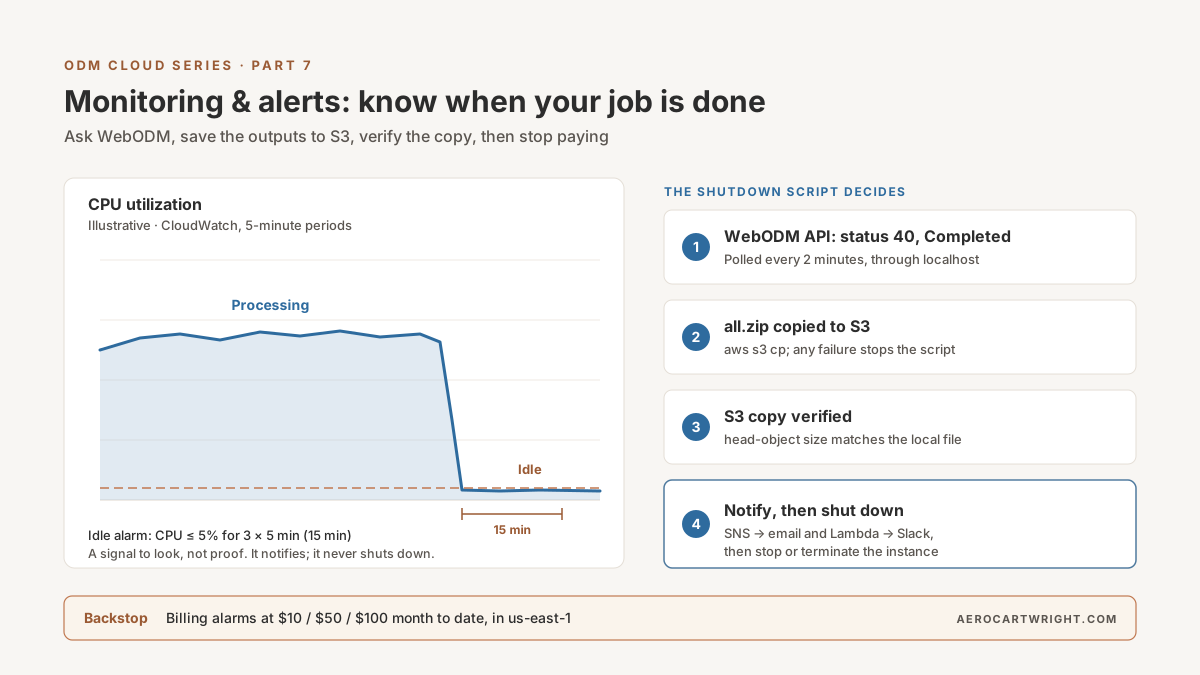
When the processing engine finishes, the instance has nothing left to do and its CPU drops. CloudWatch can see that.
What You Get Without Installing Anything
EC2 sends CPU and network metrics to CloudWatch by default, in the AWS/EC2 namespace. Its disk metrics need care: DiskReadOps, DiskWriteBytes and the other Disk* metrics count only instance-store volumes, so on an EBS-only instance they read 0 or are missing. I/O on your EBS root volume shows up instead as EBSReadOps/EBSWriteBytes (and similar) in AWS/EC2 on Nitro-based instances, and per volume in the AWS/EBS namespace (AWS: EC2 instance metrics). None of these report free disk space. With this default (“basic monitoring”), metrics arrive in 5-minute periods at no charge; 1-minute “detailed monitoring” is a paid option (AWS: basic vs detailed monitoring). Memory is not one of the default metrics.
Pull the last hour of CPU for your instance:
aws cloudwatch get-metric-statistics \
  --region us-east-2 \
  --namespace AWS/EC2 \
  --metric-name CPUUtilization \
  --dimensions Name=InstanceId,Value=i-0123456789abcdef0 \
  --start-time 2026-10-02T00:00:00Z \
  --end-time 2026-10-02T01:00:00Z \
  --period 300 \
  --statistics Average
Illustrative output (your numbers will differ):
{
    "Label": "CPUUtilization",
    "Datapoints": [
        {"Timestamp": "2026-10-02T00:05:00Z", "Average": 65.2, "Unit": "Percent"},
        {"Timestamp": "2026-10-02T00:10:00Z", "Average": 68.4, "Unit": "Percent"},
        {"Timestamp": "2026-10-02T00:15:00Z", "Average": 4.2, "Unit": "Percent"}
    ]
}
A drop from high CPU to near zero that stays there usually means the job is over. Usually — so treat it as a signal to look, not as proof.
Create an Idle-Instance Alarm
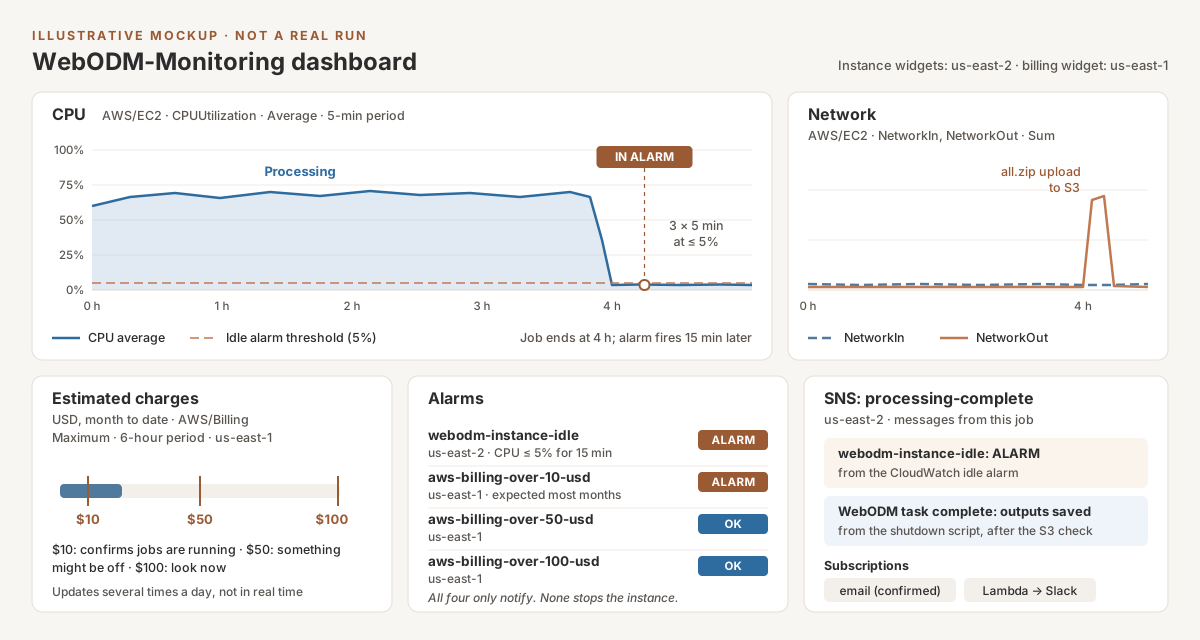
This alarm fires when average CPU stays at or below 5 percent for three 5-minute periods (15 minutes). It only sends a notification. It does not shut anything down.
aws cloudwatch put-metric-alarm \
  --region us-east-2 \
  --alarm-name "webodm-instance-idle" \
  --alarm-description "WebODM instance CPU at or below 5% for 15 minutes" \
  --namespace AWS/EC2 \
  --metric-name CPUUtilization \
  --dimensions Name=InstanceId,Value=i-0123456789abcdef0 \
  --statistic Average \
  --period 300 \
  --evaluation-periods 3 \
  --threshold 5 \
  --comparison-operator LessThanOrEqualToThreshold \
  --treat-missing-data missing \
  --alarm-actions arn:aws:sns:us-east-2:123456789012:processing-complete
The flags follow the put-metric-alarm reference: --evaluation-periods is the number of consecutive periods that must breach, and the comparison operator must be one of the named values such as LessThanOrEqualToThreshold. The SNS topic in --alarm-actions is created in the next section. Create the topic first, or re-run this command once it exists.
Avoid False Positives
A low-CPU alarm can’t tell “finished” from “not started yet.” The instance also sits near idle while it boots and while you upload images through the browser. So:
- Create the alarm after processing starts, not at launch.
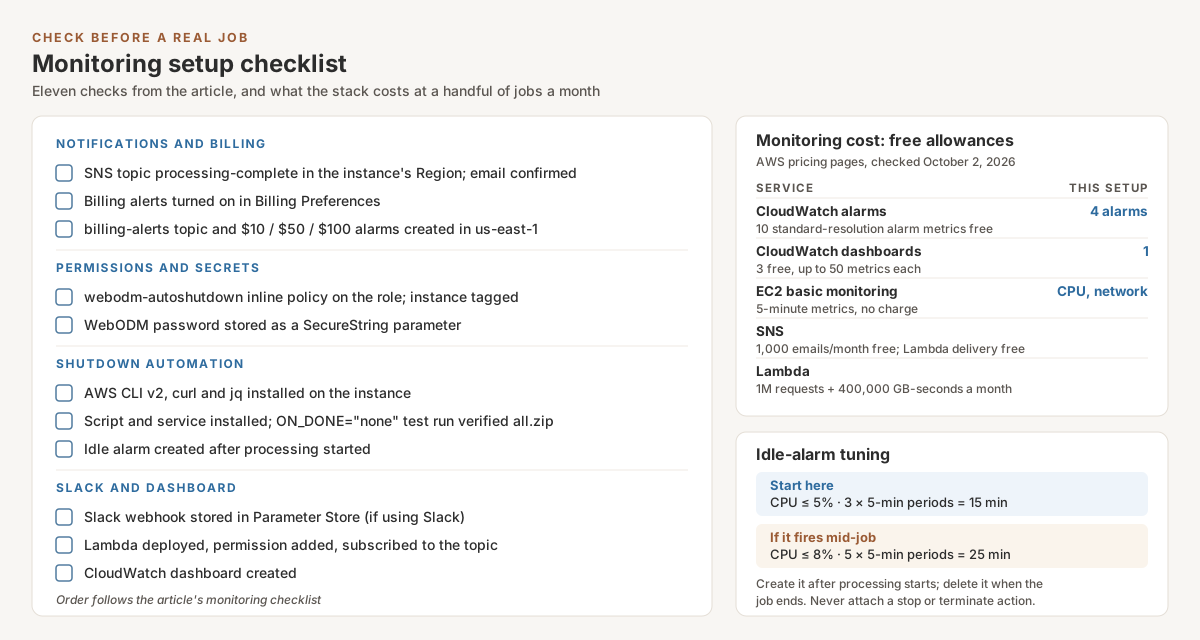
- Widen the window if it fires mid-job on your datasets: 5 evaluation periods (25 minutes) at an 8 percent threshold is a reasonable next step. Tune from your own CPU graphs.
- Never attach an EC2 stop or terminate action to this alarm. CloudWatch alarms can stop or terminate an instance directly, but an alarm can’t check that your outputs were saved first. The script later in this article does the shutdown, after it verifies the S3 copy.
- Delete the alarm when the job ends. Each launch gets a new instance ID, so the alarm is per job:
aws cloudwatch delete-alarms --region us-east-2 --alarm-names webodm-instance-idle.
Alarm actions run on state changes only and are not repeated while the condition persists (AWS: alarm actions), so you get one email per transition, not one every five minutes.
SNS: Email Notifications When Job Completes
Amazon SNS (Simple Notification Service) delivers a message published to a “topic” to every subscriber: email, a Lambda function, and others. One topic in the instance’s Region carries both the idle alarm and the shutdown script’s messages.
Create an SNS Topic
aws sns create-topic --region us-east-2 --name processing-complete
# Returns: {"TopicArn": "arn:aws:sns:us-east-2:123456789012:processing-complete"}
Subscribe Your Email
aws sns subscribe \
  --region us-east-2 \
  --topic-arn arn:aws:sns:us-east-2:123456789012:processing-complete \
  --protocol email \
  --notification-endpoint you@example.com
AWS sends a confirmation email. Nothing is delivered until you click the link in it.
Test It
aws sns publish \
  --region us-east-2 \
  --topic-arn arn:aws:sns:us-east-2:123456789012:processing-complete \
  --subject "Test: WebODM processing complete" \
  --message "This is a test. Processing would be done now."
Check your inbox, including spam.
Billing Alarms: Prevent Cost Overruns
Set CloudWatch to alert you when your month-to-date AWS bill crosses a threshold. A stalled job or a forgotten instance shows up here even if every other alert fails.
Three things trip people up, all from the AWS billing alarm guide:
- Turn billing alerts on first. In the Billing and Cost Management console, open Billing Preferences, edit Alert preferences, choose “Receive CloudWatch Billing Alerts” and save. Billing data takes about 15 minutes to appear afterwards.
- Billing metrics live only in US East (N. Virginia),
us-east-1, and cover worldwide charges. Create the alarms there, whatever Region your instance runs in. To keep it simple, the billing topic goes inus-east-1too. - The metric updates several times a day, not in real time. Billing alarms catch drift over hours, not a runaway job in its first hour. That’s what the idle alarm and the shutdown script are for.
Create the Billing Topic and Alarms
# Billing data lives in us-east-1, so the topic and alarms go there
aws sns create-topic --region us-east-1 --name billing-alerts

aws sns subscribe \
  --region us-east-1 \
  --topic-arn arn:aws:sns:us-east-1:123456789012:billing-alerts \
  --protocol email \
  --notification-endpoint you@example.com

# One alarm per threshold: $10, $50, $100 month-to-date
for T in 10 50 100; do
  aws cloudwatch put-metric-alarm \
    --region us-east-1 \
    --alarm-name "aws-billing-over-${T}-usd" \
    --alarm-description "Estimated charges this month passed ${T} USD" \
    --namespace AWS/Billing \
    --metric-name EstimatedCharges \
    --dimensions Name=Currency,Value=USD \
    --statistic Maximum \
    --period 21600 \
    --evaluation-periods 1 \
    --datapoints-to-alarm 1 \
    --threshold "$T" \
    --comparison-operator GreaterThanThreshold \
    --treat-missing-data missing \
    --alarm-actions arn:aws:sns:us-east-1:123456789012:billing-alerts
done
The settings mirror AWS’s console procedure: Maximum statistic, 6-hour period (21,600 seconds), static “greater than” threshold, 1 of 1 datapoints, missing data treated as missing.
Suggested thresholds:
- $10 — confirms jobs are running. Expect it most months.
- $50 — something might be off: a long job, or an instance left on.
- $100 — something is wrong. Open the EC2 console and look now.
None of these alarms shuts anything down. A billing alarm can’t: the metric is account-wide, with no instance attached. For scale, at the October 2, 2026 spot rate used below ($0.1305/hr), one forgotten r5.2xlarge costs 168 h × $0.1305 = $21.92 a week in compute alone, before storage.
WebODM API Polling: Ask the Server Directly
CPU is a proxy. WebODM’s own REST API tells you the task’s real state. Use WebODM’s API on port 8000, not the processing node’s. In the WebODM Docker setup, the bundled NodeODX container (node-odx-1) only exposes port 3000 to the other containers. It isn’t published to the host (docker-compose.nodeodm.yml).
What the WebODM task API docs give you:
- Endpoint:
GET /api/projects/<project_id>/tasks/<task_id>/, authenticated with a headerAuthorization: JWT <token>fromPOST /api/token-auth/(authentication). Tokens expire after six hours by default; an expired token returns 403. - Task IDs are UUIDs, not 1, 2, 3. Open the task’s map view and the URL has the form
/map/project/<project_id>/task/<task_id>/(WebODM URL routes). statusis an integer:
| Code | Meaning |
|---|---|
| 10 | Queued |
| 20 | Running |
| 30 | Failed |
| 40 | Completed — assets ready to download |
| 50 | Canceled |
The same response carries running_progress (0 to 1) and available_assets (for example all.zip, orthophoto.tif).
Polling Script in Python (Your Laptop)
Port 8000 serves plain HTTP. Don’t send your WebODM password across the internet in the clear. Open an SSH tunnel and poll through it:
# Terminal 1: forward local port 8000 to WebODM on the instance
ssh -i /path/to/your-key-pair.pem -N -L 8000:localhost:8000 ubuntu@YOUR_INSTANCE_IP
# poll_webodm.py — needs Python 3 and: pip install requests
import getpass
import time

import requests

WEBODM = "http://localhost:8000"      # through the SSH tunnel
PROJECT_ID = 1                         # from the map view URL
TASK_ID = "paste-the-task-uuid-here"   # from the map view URL
STATUS = {10: "Queued", 20: "Running", 30: "Failed", 40: "Completed", 50: "Canceled"}


def login(user, password):
    r = requests.post(f"{WEBODM}/api/token-auth/",
                      data={"username": user, "password": password}, timeout=30)
    r.raise_for_status()
    return r.json()["token"]


def main():
    user = input("WebODM username: ")
    password = getpass.getpass("WebODM password: ")
    token = login(user, password)
    url = f"{WEBODM}/api/projects/{PROJECT_ID}/tasks/{TASK_ID}/"
    while True:
        r = requests.get(url, headers={"Authorization": f"JWT {token}"}, timeout=30)
        if r.status_code == 403:       # token expired (six hours by default): log in once more
            token = login(user, password)
            r = requests.get(url, headers={"Authorization": f"JWT {token}"}, timeout=30)
        r.raise_for_status()
        task = r.json()
        status = task["status"]
        pct = round((task["running_progress"] or 0) * 100)
        print(time.strftime("%H:%M:%S"), STATUS.get(status, "Waiting"), f"{pct}%")
        if status in (30, 40, 50):
            return status
        time.sleep(60)


if __name__ == "__main__":
    print("Final status:", STATUS[main()])
Run it in a second terminal. It checks once a minute and exits when the task reaches Failed, Completed or Canceled.
Auto-Shutdown Script: Save, Verify, Then Stop Paying
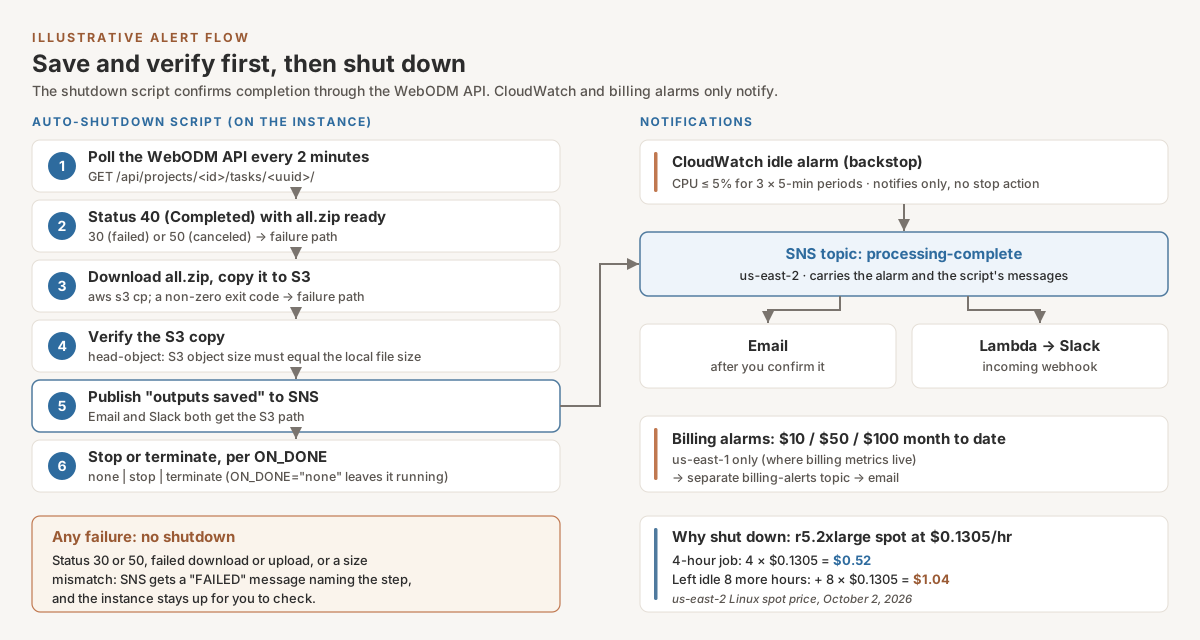
The most expensive mistake in this setup is forgetting an instance overnight. At the AWS spot price for r5.2xlarge Linux in us-east-2 on October 2, 2026 — $0.1305/hr — a 4-hour job costs 4 × $0.1305 = $0.52. Leave it idle another 8 hours and you add 8 × $0.1305 = $1.04, twice the cost of the job itself. Spot prices move: part 3 quoted $0.153/hr in April 2026.
The fix is a script on the instance that waits for the task, saves the results to S3, checks the saved copy, and only then stops or terminates the instance.
Warning — terminating destroys data. Terminating an instance is permanent. Every EBS volume set to delete on termination is deleted with it, and that includes the 200 GB root volume from the part 2 setup (AWS warning). After a terminate, the S3 copy is the only copy of your results. The script below terminates only after the upload has succeeded and the S3 object’s size matches the local file. Run it end to end on a throwaway test job before trusting it with client data.
Stop or Terminate?
- One-time spot instance (the part 2 setup): terminate. AWS lets you stop a spot instance only if it was launched from a persistent spot request (AWS: stop a Spot Instance). The console’s spot checkbox defaults to a one-time request.
- On-demand instance, or persistent spot request: stop. Compute billing ends and the volumes stay. You keep paying for the EBS storage until you delete them.
- Not sure:
ON_DONE="none". The script saves and verifies the outputs, emails you, and leaves the instance running for you to shut down.
Step 1: Extend the Instance Role (Least Privilege)
Part 2 launches the instance with the webodm-instance-role instance profile already attached. Don’t replace that role: you’d drop the S3 access part 2 and part 4 rely on. Add a second inline policy to the same role instead.
The script calls four AWS services:
- S3: already covered. Part 2’s role allows
s3:PutObject,s3:GetObjectands3:AbortMultipartUploadunderprojects/andtemp/. The script needss3:GetObjecttoo, becauseHeadObjectrequires it (HeadObject). The abort permission lets the CLI clean up a failed multipart upload (multipart permissions). KeepPREFIXunderprojects/. - SNS: publish to the one topic.
- SSM Parameter Store: read the one parameter that holds the WebODM password. Decrypting a SecureString requires
kms:Decrypt(Parameter Store and KMS), limited here to requests made through SSM. - EC2: stop or terminate only instances tagged
webodm-autoshutdown=true. This is the tag-condition pattern from AWS’s EC2 policy examples. The role can’t create tags, so it can’t tag other instances to make them targets.
Save as webodm-autoshutdown-policy.json on your laptop:
{
  "Version": "2012-10-17",
  "Statement": [
    {
      "Sid": "NotifyOneTopic",
      "Effect": "Allow",
      "Action": "sns:Publish",
      "Resource": "arn:aws:sns:us-east-2:123456789012:processing-complete"
    },
    {
      "Sid": "ReadWebodmPassword",
      "Effect": "Allow",
      "Action": "ssm:GetParameter",
      "Resource": "arn:aws:ssm:us-east-2:123456789012:parameter/webodm/monitor-password"
    },
    {
      "Sid": "DecryptOnlyThroughSsm",
      "Effect": "Allow",
      "Action": "kms:Decrypt",
      "Resource": "*",
      "Condition": {"StringEquals": {"kms:ViaService": "ssm.us-east-2.amazonaws.com"}}
    },
    {
      "Sid": "StopOrTerminateTaggedWorkersOnly",
      "Effect": "Allow",
      "Action": ["ec2:StopInstances", "ec2:TerminateInstances"],
      "Resource": "arn:aws:ec2:us-east-2:123456789012:instance/*",
      "Condition": {"StringEquals": {"aws:ResourceTag/webodm-autoshutdown": "true"}}
    }
  ]
}
If you never terminate, delete ec2:TerminateInstances from the last statement.
Add it to the existing role as an inline policy (put-role-policy adds or updates an inline policy and leaves the role’s other policies alone), then tag the instance:
# From your laptop, with admin credentials
aws iam put-role-policy --role-name webodm-instance-role \
  --policy-name webodm-autoshutdown \
  --policy-document file://webodm-autoshutdown-policy.json

# Mark this instance as one the role may stop or terminate.
# Tag only disposable WebODM workers.
aws ec2 create-tags --region us-east-2 --resources i-0123456789abcdef0 \
  --tags Key=webodm-autoshutdown,Value=true
Step 2: Store the WebODM Password in Parameter Store
The script needs to log in to WebODM’s API. Keep the password out of the script, the config file and your shell history:
# On your laptop. read -s keeps the password off the screen and out of history.
read -rsp "WebODM password: " WEBODM_PW; echo
aws ssm put-parameter --region us-east-2 \
  --name /webodm/monitor-password --type SecureString --value "$WEBODM_PW"
unset WEBODM_PW
Without --key-id, Parameter Store encrypts the value with the AWS managed key aws/ssm.
Step 3: Install the Tools on the Instance
SSH in. The script needs curl, jq and AWS CLI v2. Install the CLI with AWS’s own installer:
sudo apt update
sudo apt install -y curl jq unzip
curl "https://awscli.amazonaws.com/awscli-exe-linux-x86_64.zip" -o "awscliv2.zip"
unzip awscliv2.zip
sudo ./aws/install
aws --version
The CLI picks up the instance role’s credentials automatically. No access keys go on the instance.
Step 4: The Script
Save as webodm-autoshutdown.sh, then install it with sudo install -m 0755 webodm-autoshutdown.sh /usr/local/bin/:
#!/usr/bin/env bash
# /usr/local/bin/webodm-autoshutdown.sh
# Waits for one WebODM task, copies all.zip to S3, verifies the copy,
# notifies SNS, then stops or terminates this instance (ON_DONE).
# On any failure it notifies and exits WITHOUT shutting down.
set -uo pipefail
source /etc/webodm-autoshutdown.conf

WEBODM="http://localhost:8000"
TASK_URL="$WEBODM/api/projects/$PROJECT_ID/tasks/$TASK_ID"
POLL_SECONDS=120

# Instance ID from the instance metadata service (IMDSv2)
IMDS_TOKEN=$(curl -sf -X PUT "http://169.254.169.254/latest/api/token" \
  -H "X-aws-ec2-metadata-token-ttl-seconds: 21600")
INSTANCE_ID=$(curl -sf -H "X-aws-ec2-metadata-token: $IMDS_TOKEN" \
  "http://169.254.169.254/latest/meta-data/instance-id")

notify() {  # $1 = subject, $2 = message
  aws sns publish --region "$REGION" --topic-arn "$TOPIC_ARN" \
    --subject "$1" --message "$2" > /dev/null
}

fail() {    # report, leave the instance running, exit
  echo "FAILED: $1"
  notify "WebODM auto-shutdown FAILED on $INSTANCE_ID" \
    "$1. Instance $INSTANCE_ID left running; outputs are still on its disk."
  exit 1
}

[ -n "$INSTANCE_ID" ] || fail "Could not read instance ID from IMDS"

webodm_token() {  # password goes from SSM to curl's stdin, never onto the command line
  aws ssm get-parameter --region "$REGION" --name "$PASSWORD_PARAM" \
      --with-decryption --query Parameter.Value --output text \
    | tr -d '\n' \
    | curl -sf -X POST "$WEBODM/api/token-auth/" \
        --data-urlencode "username=$WEBODM_USER" \
        --data-urlencode "password@-" \
    | jq -er .token
}

# 1. Wait until the task is finished
while true; do
  if TOKEN=$(webodm_token) && TASK=$(curl -sf -H "Authorization: JWT $TOKEN" "$TASK_URL/"); then
    STATUS=$(jq -r '.status // "none"' <<< "$TASK")
    case "$STATUS" in
      40)
        # Completed AND assets extracted AND all.zip listed
        READY=$(jq -r '(.running_progress >= 1) and (.available_assets | index("all.zip") != null)' <<< "$TASK")
        [ "$READY" = "true" ] && break ;;
      30|50)
        fail "Task $TASK_ID ended with status $STATUS (30 = failed, 50 = canceled)" ;;
    esac
    echo "$(date '+%F %T') status=$STATUS, waiting"
  else
    echo "$(date '+%F %T') WebODM API not reachable or login failed, retrying"
  fi
  sleep "$POLL_SECONDS"
done

# 2. Download all.zip from WebODM to local disk
mkdir -p "$WORK_DIR"
ZIP="$WORK_DIR/$TASK_ID-all.zip"
KEY="${PREFIX}${TASK_ID}-all.zip"
curl -sf -H "Authorization: JWT $TOKEN" -o "$ZIP" "$TASK_URL/download/all.zip" \
  || fail "Download of all.zip from WebODM failed"
LOCAL_SIZE=$(stat -c %s "$ZIP")

# 3. Upload to S3; any non-zero exit code means the transfer failed
aws s3 cp "$ZIP" "s3://$BUCKET/$KEY" --region "$REGION" --only-show-errors \
  || fail "Upload to s3://$BUCKET/$KEY failed"

# 4. Verify: the object exists and its size matches the local file
REMOTE_SIZE=$(aws s3api head-object --region "$REGION" --bucket "$BUCKET" --key "$KEY" \
  --query ContentLength --output text) || fail "Could not read back s3://$BUCKET/$KEY"
[ "$REMOTE_SIZE" = "$LOCAL_SIZE" ] \
  || fail "Size mismatch: local $LOCAL_SIZE bytes, S3 $REMOTE_SIZE bytes"

# 5. Only now: notify, then shut down
notify "WebODM task complete: outputs saved" \
  "all.zip ($LOCAL_SIZE bytes) verified at s3://$BUCKET/$KEY. Instance $INSTANCE_ID action requested: $ON_DONE."

case "$ON_DONE" in
  stop)      aws ec2 stop-instances      --region "$REGION" --instance-ids "$INSTANCE_ID" \
               || fail "stop-instances failed (a one-time spot instance can't be stopped)" ;;
  terminate) aws ec2 terminate-instances --region "$REGION" --instance-ids "$INSTANCE_ID" \
               || fail "terminate-instances failed" ;;
  *)         echo "ON_DONE=$ON_DONE: leaving the instance running" ;;
esac
How it decides “done”:
- Belt and braces on “done”. Besides status 40, the script checks that
running_progressis 1 and thatall.zipis listed inavailable_assets, both documented task fields. In WebODM’s current code these should already hold at status 40: it setsrunning_progressto 1.0 and status 40 in the same save, after the results are extracted (app/models/task.py), andall.zipis assembled as a stream when you download it (app/api/tasks.py). The extra checks cost nothing and guard against future changes. - Upload success comes from the exit code. For S3 transfer commands, the AWS CLI returns 1 when one or more transfers failed (CLI return codes), and any non-zero code stops the script before shutdown.
- Failure means no shutdown. A failed, canceled or unsaved job never triggers a stop or terminate. You get an email instead, and the billing alarms are your backstop if you miss it.
WORK_DIR needs free space at least as large as all.zip. Check with df -h before you start. The script can’t protect you from a spot interruption mid-job: AWS reclaims the instance and the script never reaches step 2.
Step 5: Configure and Run It per Job
The config holds no secrets. Create it after the task has started, once you have the project ID and task UUID from the map-view URL:
sudo tee /etc/webodm-autoshutdown.conf > /dev/null << 'EOF'
REGION="us-east-2"
BUCKET="aerocartwright-odm-processing"
PREFIX="projects/project-001-Smith-Property/outputs/"
TOPIC_ARN="arn:aws:sns:us-east-2:123456789012:processing-complete"
WEBODM_USER="your-webodm-username"
PASSWORD_PARAM="/webodm/monitor-password"
PROJECT_ID="1"
TASK_ID="paste-the-task-uuid-here"
WORK_DIR="/var/tmp/webodm-export"
ON_DONE="none"   # none | stop | terminate (terminate only after a successful test run)
EOF
sudo chmod 600 /etc/webodm-autoshutdown.conf
Run it as a one-shot systemd service, so it keeps going after you log out and writes to the journal:
sudo tee /etc/systemd/system/webodm-autoshutdown.service > /dev/null << 'EOF'
[Unit]
Description=Save WebODM outputs to S3, verify, then stop or terminate this instance
After=docker.service network-online.target
Wants=network-online.target

[Service]
Type=oneshot
ExecStart=/usr/local/bin/webodm-autoshutdown.sh
EOF

sudo systemctl daemon-reload
sudo systemctl start --no-block webodm-autoshutdown.service
journalctl -u webodm-autoshutdown.service -f   # watch progress; Ctrl+C to stop watching
Don’t enable the service. It should run once per job, for the task you configured, not on every boot.
With this in place, the instance processes the dataset, saves all.zip to S3, checks the copy, emails you, and shuts itself down. No forgotten instances, and no instance that deletes your only copy of the results.
Slack Integration: Alerts to Your Team
If you’re a solo operator, email is fine. Working with a team? Slack is better.
Create a Slack Webhook
Per Slack’s incoming-webhook guide:
- Create a Slack app (or open an existing one) at api.slack.com/apps.
- Under Incoming Webhooks, switch Activate Incoming Webhooks on.
- Choose Add New Webhook to Workspace, pick a channel (e.g., #processing-alerts), and authorize.
- Copy the webhook URL.
The URL is a secret: anyone who has it can post to your channel. Slack actively hunts for and revokes leaked webhook URLs. Store it in Parameter Store, not in your code:
read -rsp "Slack webhook URL: " HOOK; echo
aws ssm put-parameter --region us-east-2 \
  --name /webodm/slack-webhook --type SecureString --value "$HOOK"
unset HOOK
Lambda Function to Send Slack Messages
Two kinds of messages land on the processing-complete topic: CloudWatch alarm notifications, which arrive as JSON (alarm message schema), and plain-text messages from the shutdown script. The function handles both and titles each message after what actually happened.
The Lambda Python runtime includes the AWS SDK (Boto3) (AWS: Python on Lambda). Third-party libraries such as requests have to be packaged with the function (AWS: .zip deployment packages). This version uses only the standard library’s urllib.request, so it deploys as a single file. Save as lambda_function.py:
import json
import os
import urllib.request

import boto3

ssm = boto3.client("ssm")
_webhook = None


def webhook_url():
    """Read the webhook from Parameter Store once per container."""
    global _webhook
    if _webhook is None:
        _webhook = ssm.get_parameter(
            Name=os.environ["WEBHOOK_PARAM"], WithDecryption=True
        )["Parameter"]["Value"]
    return _webhook


def lambda_handler(event, context):
    for record in event["Records"]:
        sns = record["Sns"]
        try:
            body = json.loads(sns["Message"])
        except json.JSONDecodeError:
            body = None

        if isinstance(body, dict) and "AlarmName" in body:   # CloudWatch alarm
            title = f"{body['AlarmName']}: {body['NewStateValue']}"
            detail = body.get("NewStateReason", "")
        else:                                                 # shutdown script text
            title = sns.get("Subject") or "WebODM notification"
            detail = sns["Message"]

        payload = {
            "text": f"{title}\n{detail}",   # fallback for notifications
            "blocks": [
                {"type": "header", "text": {"type": "plain_text", "text": title[:150]}},
                {"type": "section", "text": {"type": "mrkdwn", "text": (detail or "-")[:3000]}},
            ],
        }
        req = urllib.request.Request(
            webhook_url(),
            data=json.dumps(payload).encode("utf-8"),
            headers={"Content-Type": "application/json"},
            method="POST",
        )
        with urllib.request.urlopen(req, timeout=10) as resp:   # raises on HTTP errors
            resp.read()
    return {"posted": len(event["Records"])}
The SNS event shape (Records[].Sns.Message and Subject) is from AWS’s SNS-to-Lambda docs. The 150- and 3,000-character cuts match Slack’s limits for header and section text. Slack ignores username overrides on webhook posts, because the app’s own name and icon are used, so the payload doesn’t set one.
Deploy and Wire It Up
The function’s execution role gets the AWS managed AWSLambdaBasicExecutionRole policy for its logs (Lambda execution role), plus read access to the one parameter. Save as slack-param-policy.json:
{
  "Version": "2012-10-17",
  "Statement": [
    {
      "Effect": "Allow",
      "Action": "ssm:GetParameter",
      "Resource": "arn:aws:ssm:us-east-2:123456789012:parameter/webodm/slack-webhook"
    },
    {
      "Effect": "Allow",
      "Action": "kms:Decrypt",
      "Resource": "*",
      "Condition": {"StringEquals": {"kms:ViaService": "ssm.us-east-2.amazonaws.com"}}
    }
  ]
}
# Execution role
aws iam create-role --role-name webodm-slack-notifier \
  --assume-role-policy-document '{"Version":"2012-10-17","Statement":[{"Effect":"Allow","Principal":{"Service":"lambda.amazonaws.com"},"Action":"sts:AssumeRole"}]}'
aws iam attach-role-policy --role-name webodm-slack-notifier \
  --policy-arn arn:aws:iam::aws:policy/service-role/AWSLambdaBasicExecutionRole
aws iam put-role-policy --role-name webodm-slack-notifier \
  --policy-name read-slack-webhook --policy-document file://slack-param-policy.json

# Function (if this fails with a role error, wait a few seconds for IAM and retry)
zip function.zip lambda_function.py
aws lambda create-function --region us-east-2 \
  --function-name ProcessingCompleteNotification \
  --runtime python3.13 \
  --handler lambda_function.lambda_handler \
  --role arn:aws:iam::123456789012:role/webodm-slack-notifier \
  --zip-file fileb://function.zip \
  --timeout 15 \
  --environment "Variables={WEBHOOK_PARAM=/webodm/slack-webhook}"

# Let the processing-complete topic invoke the function
aws lambda add-permission --region us-east-2 \
  --function-name ProcessingCompleteNotification \
  --statement-id AllowSNSInvoke \
  --action lambda:InvokeFunction \
  --principal sns.amazonaws.com \
  --source-arn arn:aws:sns:us-east-2:123456789012:processing-complete

# Subscribe the function to the same topic the alarm and the script publish to
aws sns subscribe --region us-east-2 \
  --topic-arn arn:aws:sns:us-east-2:123456789012:processing-complete \
  --protocol lambda \
  --notification-endpoint arn:aws:lambda:us-east-2:123456789012:function:ProcessingCompleteNotification
Re-run the SNS test publish from earlier. The email and the Slack message should both arrive. Billing alarms stay email-only in us-east-1 in this setup.
The Full Monitoring Stack
Here’s how the pieces fit together:
- Instance launches with WebODM, the IAM role and the
webodm-autoshutdown=truetag - You upload images and start the task
- You write the config with the task UUID and start the shutdown service
- You create the idle alarm for this instance
- The script polls the WebODM API every 2 minutes
- Task reaches status 40 with assets ready
- Script downloads
all.zip, uploads it to S3, and checks the size of the S3 copy - Script publishes to SNS: email and Slack both get “outputs saved”
- Script stops or terminates the instance (or leaves it running if
ON_DONE="none") - If anything fails, you get a failure message and the instance stays up; the billing alarms catch anything you miss
Visualized:
Instance running (WebODM + shutdown service)
     |
WebODM processing          CloudWatch idle alarm (backstop)
     |                          |
Script polls WebODM API         +--> SNS processing-complete
     |                                   |-- Email
Status 40 + all.zip ready                +-- Lambda -> Slack
     |
Download all.zip -> aws s3 cp -> head-object size check
     |                     |
  sizes match           any failure
     |                     |
SNS "outputs saved"     SNS "FAILED", instance left running
     |
Stop / terminate (per ON_DONE)
Monitoring Dashboard
Pull everything into one CloudWatch dashboard. Each widget names its own Region (dashboard body structure), so the instance widgets read us-east-2 and the billing widget reads us-east-1.
aws cloudwatch put-dashboard \
  --region us-east-2 \
  --dashboard-name WebODM-Monitoring \
  --dashboard-body '{
    "widgets": [
      {
        "type": "metric",
        "properties": {
          "title": "CPU",
          "metrics": [["AWS/EC2", "CPUUtilization", "InstanceId", "i-0123456789abcdef0"]],
          "stat": "Average",
          "period": 300,
          "region": "us-east-2"
        }
      },
      {
        "type": "metric",
        "properties": {
          "title": "Network",
          "metrics": [
            ["AWS/EC2", "NetworkIn", "InstanceId", "i-0123456789abcdef0"],
            ["AWS/EC2", "NetworkOut", "InstanceId", "i-0123456789abcdef0"]
          ],
          "stat": "Sum",
          "period": 300,
          "region": "us-east-2"
        }
      },
      {
        "type": "metric",
        "properties": {
          "title": "Estimated charges (USD, month to date)",
          "metrics": [["AWS/Billing", "EstimatedCharges", "Currency", "USD"]],
          "stat": "Maximum",
          "period": 21600,
          "region": "us-east-1"
        }
      }
    ]
  }'
That gives you three widgets:
- CPU — tells you if processing is active or done
- Network — shows the upload to S3 at the end of the job
- Estimated charges — the number you actually care about
Update the instance ID in the first two widgets for each new launch.
Common Monitoring Issues
Idle alarm never triggers:
CPU probably isn’t dropping the way you think. Check the actual numbers:
# On the instance
top

# Or from CloudWatch: six hours of 5-minute averages
aws cloudwatch get-metric-statistics \
  --region us-east-2 \
  --namespace AWS/EC2 \
  --metric-name CPUUtilization \
  --dimensions Name=InstanceId,Value=i-0123456789abcdef0 \
  --start-time 2026-10-02T00:00:00Z \
  --end-time 2026-10-02T06:00:00Z \
  --period 300 \
  --statistics Average
If CPU stays well above the threshold after the job ends, something else is running. Find it in top before you raise the threshold.
Billing alarm stuck in INSUFFICIENT_DATA:
Three causes. Billing alerts aren’t turned on in Billing Preferences. Or the alarm isn’t in us-east-1. Or the alarm is new: with a 6-hour period it sits in INSUFFICIENT_DATA until its first datapoint arrives, so give it several hours before you suspect the first two.
Email notifications missing:
Check spam, and check that you clicked the subscription confirmation link: aws sns list-subscriptions-by-topic --region us-east-2 --topic-arn arn:aws:sns:us-east-2:123456789012:processing-complete shows PendingConfirmation until you do.
Slack messages not arriving:
Check the Lambda logs:
aws logs tail /aws/lambda/ProcessingCompleteNotification --region us-east-2 --follow
A ParameterNotFound or AccessDeniedException points to the parameter name or the role policy. An HTTP error from Slack means the webhook was revoked or mistyped — create a new one and overwrite the parameter with put-parameter --overwrite.
Shutdown script didn’t shut down:
That’s the safe failure. Read why:
systemctl status webodm-autoshutdown.service
journalctl -u webodm-autoshutdown.service --no-pager | tail -50
You should also have a “WebODM auto-shutdown FAILED” email whose text names the step that failed. “stop-instances failed” on a spot instance means it came from a one-time request: set ON_DONE="terminate", or shut it down yourself. If the stop or terminate call is what failed, you will already have the “outputs saved” email too: the S3 copy is fine, only the shutdown didn’t happen.
Idle alarm too sensitive (fires mid-job):
put-metric-alarm with an existing name replaces the alarm’s whole configuration, so pass every flag again, not just the ones you’re changing:
aws cloudwatch put-metric-alarm \
  --region us-east-2 \
  --alarm-name "webodm-instance-idle" \
  --alarm-description "WebODM instance CPU at or below 8% for 25 minutes" \
  --namespace AWS/EC2 \
  --metric-name CPUUtilization \
  --dimensions Name=InstanceId,Value=i-0123456789abcdef0 \
  --statistic Average \
  --period 300 \
  --evaluation-periods 5 \
  --threshold 8 \
  --comparison-operator LessThanOrEqualToThreshold \
  --treat-missing-data missing \
  --alarm-actions arn:aws:sns:us-east-2:123456789012:processing-complete
Now it waits 25 minutes (5 periods × 5 minutes) at or below 8 percent CPU before firing.
Monitoring Cost
At a handful of jobs a month, this setup stays inside AWS’s free allowances (checked October 2, 2026):
- EC2 basic monitoring metrics — no charge (AWS)
- CloudWatch alarms and dashboards — the free tier covers 10 standard-resolution alarm metrics and 3 custom dashboards of up to 50 metrics each (CloudWatch pricing). This setup uses 4 alarms (1 idle + 3 billing) and 1 dashboard.
- SNS — 1,000 email notifications a month free, and no per-message charge for delivery to Lambda (SNS pricing)
- Lambda — 1 million requests and 400,000 GB-seconds a month free (Lambda pricing)
- Parameter Store — two standard SecureString parameters, encrypted with the AWS managed key
S3 storage for the saved all.zip files is a separate line item. Part 4 covers it.
Monitoring Checklist
- SNS topic
processing-completecreated in the instance’s Region; email subscription confirmed - Billing alerts turned on in Billing Preferences
-
billing-alertstopic and $10 / $50 / $100 alarms created inus-east-1 -
webodm-autoshutdowninline policy added towebodm-instance-role; instance taggedwebodm-autoshutdown=true - WebODM password stored as a SecureString parameter
- AWS CLI v2,
curlandjqinstalled on the instance - Shutdown script and service installed; first test run with
ON_DONE="none"saved and verifiedall.zip - Idle alarm created after processing started
- Slack webhook stored in Parameter Store (if using Slack)
- Lambda deployed, permission added, subscribed to the topic
- CloudWatch dashboard created
Bottom Line
No more babysitting. The shutdown script asks WebODM directly whether the job is done, saves the results to S3, checks the copy, and only then shuts the instance down. CloudWatch and the billing alarms catch whatever the script can’t.
Compute for a 4-hour job: 4 × $0.1305 = $0.52 at the October 2, 2026 us-east-2 spot rate for r5.2xlarge. Monitoring: inside the free tier at this volume. Your time: open the email, grab the S3 path.
This turns processing from “set and hope” into “set, get notified, move on.”
To get the saved outputs to a client, see Sharing Results: From WebODM to Client Map Link (part 6).